
Stock just went negative on Shopee. Your warehouse count still shows 12 units.
That mismatch lives between your marketplace system and your warehouse floor. A WMS management system closes that gap. It controls what happens inside the warehouse: where products are stored, how they move, and whether your digital count matches physical reality.
What Is a WMS Management System?
A WMS management system (warehouse management system) is software that assigns every product a physical storage location, generates pick lists for warehouse staff, tracks stock movement, and syncs inventory to connected sales channels. According to the e-Conomy SEA 2024 report by Google, Temasek, and Bain, Indonesia’s ecommerce GMV exceeded USD 60 billion in 2023 — the scale that makes warehouse errors expensive.
A WMS management system sits between your sales channels (Shopee, Tokopedia, Lazada) and your warehouse floor. It translates “Order #45821: 1x Blue Phone Case XR” into a specific instruction: “Go to Bin A3-R2-S4, pick 1 unit.”
Without a WMS, warehouse workers rely on memory or informal shelf labels. That works for 50 SKUs in a single room. It fails when you add staff, expand your SKU range, or run a Harbolnas campaign that doubles your daily order volume overnight.
The term “WMS management system” is used interchangeably with “warehouse management system” or “WMS software.” The distinction that matters is scope: some tools focus purely on physical warehouse operations (bin tracking, pick lists, receiving), while others combine WMS features with order management and inventory management in one platform.

What Core Functions Does a WMS Management System Handle?
A WMS management system covers five core functions: bin location assignment, pick list generation, stock movement tracking, receiving workflows, and cycle counting. Sellers who implement structured bin management report order accuracy improvements of 20-40%, based on published case studies from Ginee and Jubelio user communities.
Not every WMS feature carries equal weight for Indonesian ecommerce operations. Here are the capabilities that matter most.
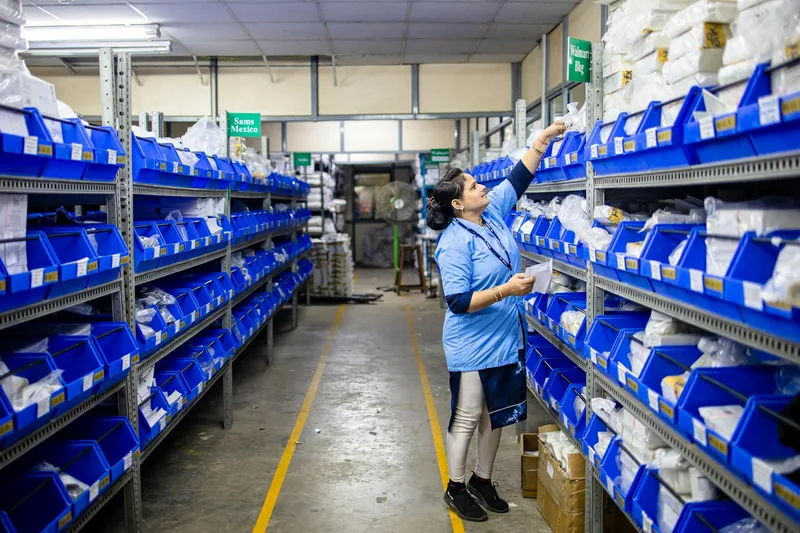
Bin Location Assignment. Every product gets a permanent address — not just “shelf 3” but Aisle A, Rack 2, Shelf 3, Bin 04. The WMS maps your entire warehouse and assigns open bins to new SKUs on arrival. When a product sells out, the bin is marked empty and becomes available for the next incoming shipment.
Pick List Generation. A WMS turns incoming orders into optimized pick lists. Basic systems generate one list per order. Advanced systems support wave picking — grouping multiple orders so your picker visits each bin once per run instead of repeatedly walking back to the same location. For operations processing 100+ orders per day, wave picking cuts total pick time by 30-40%, per published documentation from Anchanto and Jubelio.
Stock Movement Tracking. Every product movement through the warehouse gets logged: supplier receiving → bin assignment → picking → packing → dispatch. This creates an audit trail. When a discrepancy appears — 47 orders shipped but only 44 picks logged — the movement history narrows the problem to a specific step.
Receiving and Put-Away Workflows. When new stock arrives, the WMS guides the process: scan the shipment, verify against the purchase order, and assign a bin location. Advanced systems suggest put-away spots based on selling speed — fast movers near the packing station, slow movers to back aisles.
Cycle Counting. Instead of a full warehouse shutdown for an annual count, the WMS runs continuous small counting tasks. Count Bins A-01 through A-10 today, A-11 through A-20 tomorrow. Over a month, every location gets counted without disrupting operations.

How Does a WMS Manage Inventory Across Indonesian Marketplaces?
A WMS management system syncs physical warehouse counts to Shopee, Tokopedia, Lazada, TikTok Shop, and Bukalapak through direct API integrations. Without synchronized counts, Indonesian multi-channel sellers face a 10-25% oversell risk during peak periods — a single Harbolnas flash sale can generate 20+ oversold orders within minutes.
The multi-channel environment in Indonesia makes warehouse accuracy critical. Orders from Shopee, Lazada, Tokopedia, TikTok Shop, and Bukalapak arrive almost simultaneously. A WMS that syncs to all channels ensures the warehouse floor count matches every marketplace’s available stock display.
Here is how the sync works in practice:
- Your warehouse holds 50 units of SKU #X-001
- All connected marketplaces show 50 units available
- Three orders arrive simultaneously: 1 Shopee, 1 Lazada, 1 Tokopedia
- WMS records 3 pickings → 47 units remaining
- All three marketplaces update to 47 units
Without WMS-driven sync, step 5 happens on a delay — or not at all until the next scheduled sync. For sellers who run flash sales with limited quantities, the gap between physical pick and marketplace display is where overselling occurs.
The main WMS-capable platforms in Indonesia with confirmed marketplace integrations (per official platform documentation):
| Platform | Shopee | Tokopedia | Lazada | TikTok Shop | Bukalapak | Sync Type |
|---|---|---|---|---|---|---|
| Ginee | ✓ | ✓ | ✓ | ✓ | ✓ | Near-real-time |
| Jubelio | ✓ | ✓ | ✓ | ✓ | ✓ | Near-real-time |
| Sellercraft | ✓ | ✓ | ✓ | ✗ | ✗ | Periodic |
| Anchanto | ✓ | ✓ | ✓ | ✓ | ✗ | Near-real-time |
Managing orders across 3+ marketplaces without a centralized system? The ecommerce order management system guide maps which tools cover both WMS and OMS functions so you are not running two separate systems.
Which WMS Management Systems Are Available in Indonesia?
Indonesian ecommerce sellers have four credible WMS management system options: Ginee (free to IDR 600,000/month), Jubelio (from IDR 499,000/month), Sellercraft (from IDR 300,000/month), and Anchanto (from IDR 5,000,000/month). Jubelio offers the deepest WMS feature set for mid-market sellers, based on platform documentation and seller community reports.
Ginee is the most widely used tool among Indonesian small-to-mid sellers. Its WMS features include basic bin management, stock alerts, and simple pick lists. The free tier supports up to 100 orders per month. Paid plans (IDR 150,000-600,000/month based on order volume, per Ginee’s published pricing) add more channels and higher order limits. Right for sellers with under 300 SKUs who need marketplace sync more than deep warehouse control.
Jubelio targets mid-market sellers with a genuine WMS module — bin location management, cycle counting, multi-warehouse support, and structured receiving workflows. Pricing starts at approximately IDR 499,000/month per Jubelio’s pricing page. The most commonly recommended option in Indonesian ecommerce seller communities for sellers who have outgrown Ginee but are not ready for enterprise tools.
Sellercraft covers basic inventory tracking and simple warehouse workflows. It integrates with Shopee, Tokopedia, and Lazada, but lacks TikTok Shop and Bukalapak. Starting price is approximately IDR 300,000/month based on seller community reports. Best for straightforward single-warehouse operations.
Anchanto is built for complex, multi-warehouse operations. Its WMS capabilities include zone management, wave picking, advanced receiving workflows, and cross-border inventory coordination. Enterprise pricing starts at approximately IDR 5,000,000/month per Anchanto’s published pricing information. Right for operations managing 500+ SKUs across multiple storage facilities; overkill for single-warehouse sellers.
For a deeper breakdown of WMS feature sets and implementation steps, see our WMS systems guide.
How Do You Choose the Right WMS Management System?
Match WMS scale to operation size: under 200 SKUs and 30 daily orders → Ginee; 200-800 SKUs and 30-200 orders → Jubelio; 800+ SKUs or multi-warehouse → Anchanto. Overshoot on complexity and you create workflow friction without measurable accuracy gains.
The most common buying mistake: choosing a WMS based on features rather than current scale. A seller processing 40 orders per day from a 100-SKU warehouse does not benefit from wave picking algorithms or zone-level routing. The added setup complexity creates friction without solving real problems.
| Scale | SKU Count | Daily Orders | Staff | Recommended Tool |
|---|---|---|---|---|
| Small | Under 200 | Under 30 | 1-2 | Ginee (basic WMS) |
| Mid | 200-800 | 30-200 | 2-5 | Jubelio (warehouse module) |
| Large | 800-2,000 | 200-500 | 5-15 | Jubelio (advanced) or Anchanto |
| Enterprise | 2,000+ | 500+ | 15+ | Anchanto or custom WMS |
Two questions to verify before signing a contract:
Does it support your specific marketplace mix? “Supports marketplaces” in marketing materials means different things. If you sell on TikTok Shop, verify TikTok Shop integration specifically — not every platform supports it.
What is the actual sync interval? “Real-time sync” in marketing copy often means 5-15 minute intervals in practice. For flash sales and Harbolnas, a 15-minute lag can mean 20+ oversold orders. Ask for a test account and verify sync speed against your live marketplace before committing.
For the operational context around WMS decisions — how WMS connects to your order fulfillment workflow — see the whse management system guide.

Frequently Asked Questions
What is a WMS management system?
A WMS management system (warehouse management system) is software that controls physical stock movement inside a warehouse. It assigns bin locations, generates pick lists, tracks movement, and syncs inventory to sales channels. Indonesian sellers with 80+ daily orders across Shopee, Tokopedia, and Lazada typically see 20-40% fewer picking errors after implementing structured bin workflows.
What is the difference between a WMS and an inventory management system?
An inventory management system tracks how much stock exists across locations and channels. A WMS manages how that stock physically moves inside the warehouse — where it is stored, how it is picked, and how it is received from suppliers. Tools like Ginee and Jubelio combine both functions, but dedicated WMS platforms add deeper warehouse control: bin-level tracking, wave picking, and cycle counting not available in basic inventory apps.
How much does a WMS management system cost in Indonesia?
Pricing ranges from free (Ginee’s basic tier for up to 100 orders/month) to IDR 499,000-2,000,000 per month for mid-tier platforms like Jubelio with a full warehouse module. Enterprise tools like Anchanto start at IDR 5,000,000+ per month and scale by SKU count, warehouse size, and connected channels. Most mid-size Indonesian sellers start with Jubelio’s warehouse module at IDR 499,000/month.
Can a WMS management system integrate with Shopee, Tokopedia, and Lazada?
Yes. Ginee, Jubelio, Sellercraft, and Anchanto all integrate directly with Shopee, Tokopedia, and Lazada. Ginee and Jubelio also support TikTok Shop and Bukalapak. Integration depth varies by platform. Verify the actual sync interval — not just whether integration exists — before committing, especially for peak periods like Harbolnas.
When do you need a WMS versus a basic inventory app?
A basic inventory app handles under 200 SKUs, fewer than 30 daily orders, and 1-2 staff. A WMS becomes necessary when you reach 300+ SKUs, 2+ warehouse staff, and 80+ daily orders — or when picking errors and stock discrepancies start appearing regularly. The 200-300 SKU range with growing order volume is the signal zone.
Keep Reading
- WMS Systems: What They Are and How They Work — a deeper look at WMS feature sets and when to implement
- Whse Management System: Warehouse Ops for Ecommerce — operational workflows for mid-market Indonesian warehouses
- Ecommerce Order Management Systems — how WMS connects to OMS for end-to-end order fulfillment